
MT4 and MT5 liquidity bridge and gateway setup
Your execution stack,
connected and watched.
Most execution complaints come from a bridge setting, not the price. We connect, configure, monitor and support the liquidity bridge, MT4 and MT5 gateways and liquidity stack you run, including PrimeXM, oneZero, Centroid, Gold-i and FXCubic: symbol mapping, aggregation, routing, failover and alerts when a feed misbehaves. Your LP relationships stay yours.
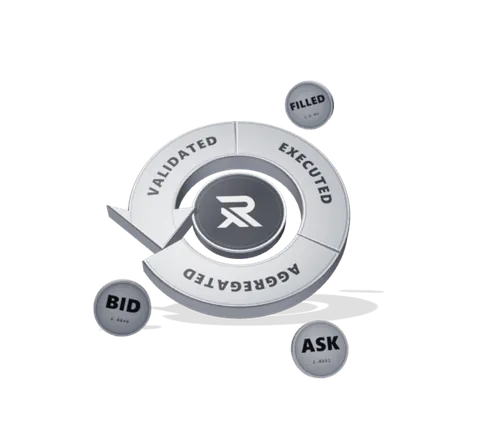
Your liquidity, your terms
Your LP relationships and commercials stay yours. We are the technical team that makes them work with your platform, and keeps them working.
Fix execution at the source
Most complaints come from a symbol map, a routing rule or a session setting, not the price. That is exactly where we work.
Monitored, with an engineer behind it
Feed health, routing and rejections are monitored, and every alert goes to an engineer who knows how your stack is wired.
Every connection, with its state.
Each feed and route shows its state and its queue. Nothing fails quietly.

MT4 and MT5 bridge and gateway setup
We install, configure and keep your bridge current, using the technology you have already chosen — no need to switch vendors.
- Bridge deployment and configuration
- Gateway configuration on the trade server
- Integration and connectivity experience with FXCubic and PrimeXM
- Version upgrades planned around trading hours
- Environment separation between live and test
LP connectivity and liquidity aggregation
Connecting a liquidity provider takes credentials, sessions, symbol mapping and clear rules for when the feed is thin. We set it up, test it and keep it working.
- Liquidity provider connectivity
- Price feed configuration and validation
- Symbol mapping across providers and platform
- Aggregation and backup feed arrangement
- Session and trading-hour alignment
Routing and execution rules
Which flow goes where, under which conditions, and what happens when the first route is down. Routing has direct commercial impact, so we document it and change it deliberately.
- Routing rules by symbol, group and account
- A-book, B-book and hybrid configuration as you define it
- Markup, spread and execution parameter configuration
- Backup routing and failover behaviour
- Change records for every routing decision
Execution monitoring
Execution problems usually show up before a client reports them. We watch feed state, latency, rejections and session health, and investigate anomalies against your configuration instead of guessing.
- Feed and session health monitoring
- Latency and rejection pattern visibility
- Alerting on loss of connectivity
- Investigation against your own configuration
- Escalation to a named engineer
Where the bridge sits.
Between your trade server and your providers, with the routing and failover rules that decide where each order goes.
fills returned from your liquidity providers in the last year
What we connect
- Bridge technologies
- Integration and connectivity experience with FXCubic and PrimeXM.
- Integrated
- Gateways
- MT5 Gateway configuration for quote and order routing.
- Configured
- Liquidity providers
- Connected through the interface each provider publishes.
- Integrated
- Price feeds
- Feed configuration, symbol mapping and validation.
- Configured
- Failover
- Backup connectivity and the behaviour when a route is lost.
- Planned
- Monitoring
- Feed, session and rejection monitoring with alerting.
- Operated
Liquidity bridges, answered.
What is a liquidity bridge in forex?
A liquidity bridge is the software between a broker's trading platform and its liquidity providers. It takes orders from the trade server, routes them to one or more providers under the broker's rules, and brings prices and fills back. Most bridges also aggregate prices from several providers, apply markups, and decide what happens when a provider is slow or unavailable.
What is the difference between a liquidity bridge and an MT5 gateway?
On MT5 a gateway is the platform's own connector: a module on the trade server, built on the MetaTrader Gateway API, that passes quotes and orders to an external system. The bridge is the system on the other side, which aggregates providers, applies routing rules and manages execution. Many setups use both: the gateway connects MT5 to the bridge, and the bridge connects to the providers. On MT4 the bridge connects through a server plugin instead.
Do we need a liquidity aggregator?
Once you take prices from more than one provider, in practice yes: aggregation builds one book from several feeds, so clients see the best available price and orders can be split or routed by rule. Most commercial bridges include an aggregator. With a single provider, a backup feed and a clear failover rule matter more than aggregation.
Is relioops a bridge provider or a liquidity provider?
relioops is not a liquidity provider, and your LP relationships and commercials stay yours. On this service the work is the bridge and providers you have already chosen: we set them up, configure them, monitor them and support them, alongside the MT4 or MT5 server they connect to.
Why do clients complain about execution when prices look fine?
Because the cause is usually configuration, not price: a symbol mapped to the wrong contract size, a session that closes earlier on the provider than on the platform, a markup applied twice, a route that quietly falls back to a slower provider. We investigate against your configuration and the bridge's own logs before changing anything.
What happens when a liquidity provider goes down?
Whatever you decided in advance: orders move to a backup route, the affected symbols switch to a backup feed or are disabled, and the desk is alerted. Without a written failover rule the bridge falls back on its defaults, which is rarely what you want during volatile hours. We plan, test and document that behaviour as part of the setup.
What it connects.
Reached through each system’s own interface, so nothing has to be replaced to be included.
Trading platforms
Accounts, groups, symbols and execution through the platform's own manager interface.



Infrastructure
Deployed to your cloud account or ours, on managed components rather than bespoke ones.




Marks shown are the property of their respective owners and indicate technical compatibility. They are not a claim of partnership or endorsement.
